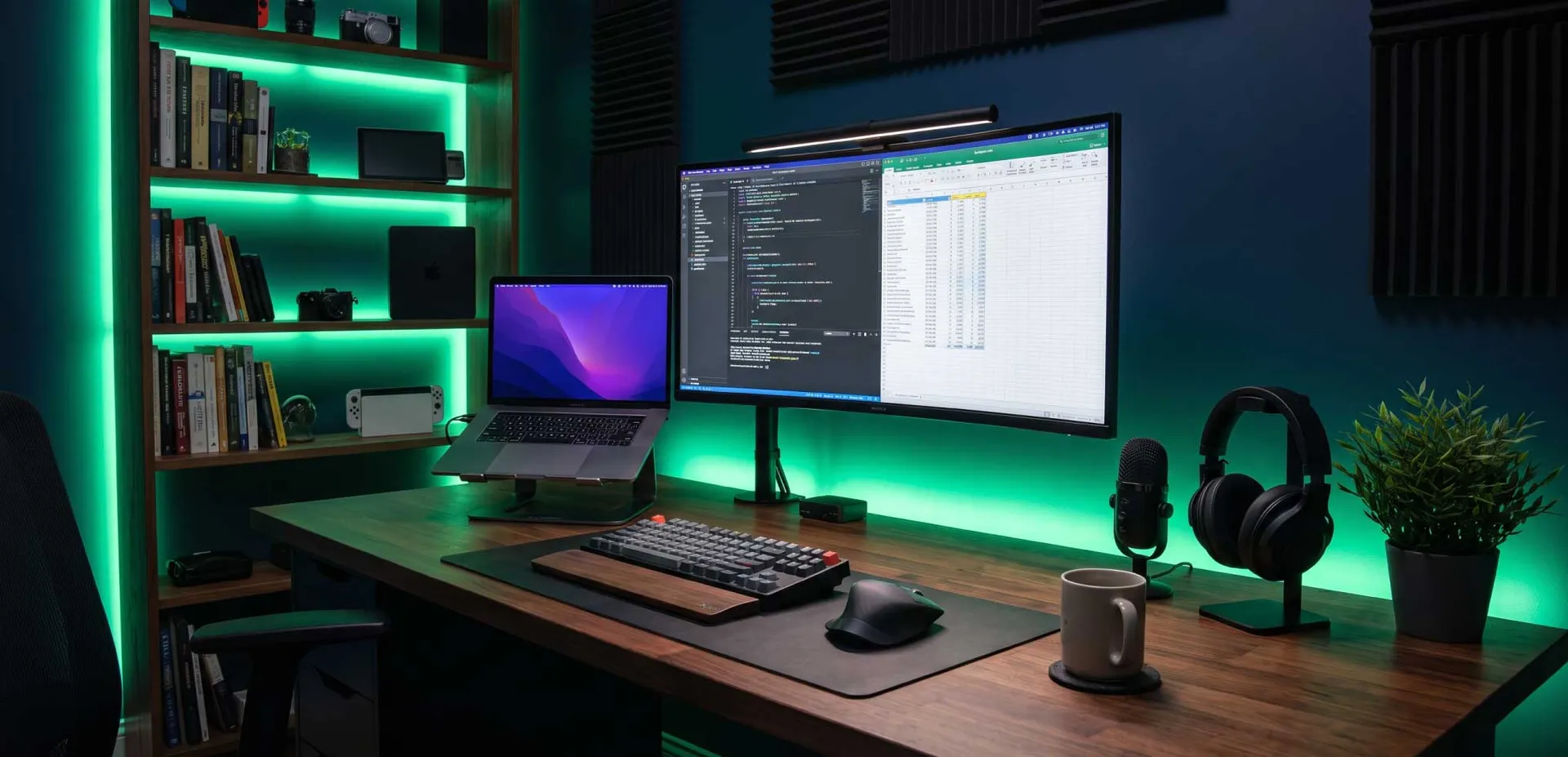
Remote work offers unparalleled flexibility, but without the right setup, it can lead to burnout, distraction, and declining output. As a PhD-level researcher and remote work strategist, I've analyzed thousands of forum discussions on Reddit, Stack Exchange, and specialized remote work communities to distill the most effective, evidence-based practices. This comprehensive checklist covers every critical element—from ergonomics and technology to routines and mental health—ensuring you build a workspace that maximizes productivity and well-being. Whether you're a freelancer struggling to stay focused or a seasoned remote professional, this guide provides actionable steps to transform your home office into a productivity powerhouse.
1. Ergonomic Foundation: Your Body's Infrastructure
Your physical setup is the bedrock of sustained productivity. Poor ergonomics leads to pain, fatigue, and cognitive decline. Invest in these core components.
1.1 Chair: The Throne of Productivity
A quality ergonomic chair is non-negotiable. Look for adjustable lumbar support, seat depth, armrests, and tilt tension. The chair should support your spine's natural S-curve. Avoid soft, cushioned chairs that encourage slouching. Consider a mesh back for breathability. Key features: seat height adjustability (so your feet rest flat), seat pan tilt (to reduce thigh pressure), and adjustable armrests (so elbows are at 90 degrees).
- Recommended investment: $300-$800 for a chair that lasts 5-10 years.
- Budget alternative: Add a lumbar cushion and footrest to your existing chair.
- Pro tip: Test chairs before buying; sit for 15 minutes to assess comfort.
1.2 Desk: The Command Center
A sit-stand desk is ideal for varying posture throughout the day. Minimum width: 60 inches for dual monitors. Ensure the desk height allows your elbows to be at 90 degrees when typing. If using a standing desk, alternate between sitting and standing every 30-60 minutes. Key considerations: stability at standing height, cable management, and surface material (avoid glossy finishes that cause glare).
- Measure your ideal sitting height: elbows at 90°, wrists straight.
- Set standing height: same elbow angle, monitor at eye level.
- Use an anti-fatigue mat when standing.
1.3 Monitor Setup: Visual Clarity
Position your primary monitor directly in front, about an arm's length away, with the top of the screen at or slightly below eye level. Use a monitor arm for flexibility. For dual monitors, place the secondary monitor at a slight angle, centered on your primary screen. Ergonomic rules: avoid tilting your head; keep your neck neutral. Use blue light filters or glasses if you experience eye strain.
2. Technology Stack: Tools That Amplify Focus
Your digital environment must be optimized for deep work. This includes hardware, software, and connectivity.
2.1 Internet Connectivity: The Lifeline
A wired Ethernet connection is preferred for stability. If using Wi-Fi, ensure a strong signal with a mesh network. Minimum speeds: 25 Mbps download, 5 Mbps upload for video conferencing. Redundancy plan: have a mobile hotspot as backup. Test your connection regularly with speed tests.
- Router placement: central, elevated, away from walls.
- Wi-Fi channel: use 5 GHz for less interference.
- VPN: essential for security; choose a provider with low latency.
2.2 Computer Hardware: The Engine
Invest in a laptop or desktop with at least 16 GB RAM, a fast SSD, and a modern processor (Intel i7 or AMD Ryzen 7). For video editing or development, consider 32 GB RAM and a dedicated GPU. Peripherals: external keyboard and mouse improve ergonomics. A high-resolution webcam (1080p) and noise-canceling microphone are critical for professional communication.
- Prioritize RAM and SSD over processor speed for multitasking.
- Use a docking station to easily connect peripherals.
- Keep your system updated and declutter storage quarterly.
2.3 Software Ecosystem: Digital Discipline
Choose tools that minimize context switching. Essential categories: project management (e.g., Asana, Trello), communication (Slack, Teams), time tracking (Toggl, RescueTime), and distraction blockers (Freedom, Cold Turkey). Automation: use Zapier to connect apps and reduce manual tasks. Backup: cloud backup (e.g., Backblaze) plus local external drive.
- Communication: set status indicators to signal focus time.
- File management: use a consistent naming convention and folder structure.
- Security: enable two-factor authentication on all accounts.
3. Environmental Design: Crafting a Distraction-Free Zone
Your physical environment profoundly impacts cognitive performance. Design your space to cue focus and minimize interruptions.
3.1 Lighting: Circadian Alignment
Maximize natural light; position your desk perpendicular to windows to avoid glare. Use adjustable task lighting (e.g., LED desk lamp with color temperature control). Warm light (2700K) in evening, cool light (5000K) during day. Avoid overhead fluorescent lights that cause flicker and eye strain.
- Morning: expose yourself to bright light within 30 minutes of waking.
- Afternoon: use cool white light to maintain alertness.
- Evening: dim lights and avoid blue light 1 hour before bed.
3.2 Acoustics: Sound Management
Control noise with acoustic panels, rugs, and curtains. Use a white noise machine or noise-canceling headphones for deep focus. Communicate with household members about your work schedule. Pro tip: use a dedicated microphone with a cardioid pattern to reduce background noise during calls.
3.3 Organization: Visual Clarity
Keep your desk clutter-free. Use cable management trays, monitor arms, and drawer organizers. Have a designated place for everything. Minimalist approach: only keep items you use daily on your desk. Use vertical storage for documents and supplies.
- Adopt a 'clean desk' policy at end of each day.
- Use a 'one in, one out' rule for physical items.
- Digitize paper documents to reduce clutter.
4. Routines and Rituals: Structuring Your Day
Without a commute to bookend your day, intentional routines are vital for work-life balance and productivity.
4.1 Morning Routine: Priming for Peak Performance
Start with a consistent wake-up time, even on weekends. Include activities that signal 'work mode': exercise, meditation, or reading. Avoid checking email or social media for the first 30 minutes. Sample routine: 6:30 AM wake, 7:00 AM exercise, 7:30 AM shower, 8:00 AM plan day, 8:30 AM start work.
- Hydrate: drink water before coffee.
- Move: 10 minutes of stretching or a short walk.
- Plan: identify your top 3 priorities for the day.
4.2 Deep Work Blocks: Uninterrupted Focus
Schedule 2-3 hour blocks for cognitively demanding tasks. During these blocks, turn off notifications, close unnecessary tabs, and use a timer (Pomodoro technique: 25 min work, 5 min break). After 4 Pomodoros, take a longer break (15-30 min). Communication: set your status to 'Do Not Disturb' and inform colleagues.
- Choose one task per block; avoid multitasking.
- Use a physical timer to stay accountable.
- Take breaks away from screens; stretch or walk.
4.3 Shutdown Ritual: Transitioning Off
End your workday with a deliberate shutdown routine. Review accomplishments, plan for tomorrow, close all work tabs, and turn off notifications. This prevents work from bleeding into personal time. Steps: 5:00 PM review tasks, 5:10 PM update to-do list, 5:15 PM close laptop, 5:20 PM leave your workspace.
- Physical cue: change clothes or go for a walk.
- Digital boundary: log out of work apps on personal devices.
- Reflection: write down one thing you achieved.
5. Health and Wellness: Sustaining Long-Term Output
Productivity is unsustainable without prioritizing physical and mental health.
5.1 Movement and Exercise
Incorporate movement every hour: stand up, stretch, or walk. Aim for 30 minutes of moderate exercise daily. Use reminders (e.g., Apple Watch stand ring) or apps (Stretchly). Desk exercises: neck rolls, shoulder shrugs, wrist stretches.
- Standing desk: alternate sitting and standing every 30 min.
- Walking meetings: take calls while walking if possible.
- Eye breaks: follow the 20-20-20 rule (every 20 min, look 20 feet away for 20 seconds).
5.2 Nutrition and Hydration
Keep a water bottle at your desk; aim for 2-3 liters daily. Avoid heavy lunches that cause afternoon slumps. Opt for protein-rich snacks (nuts, yogurt) and complex carbs (whole grains). Limit caffeine after 2 PM to avoid sleep disruption.
- Prep healthy snacks in advance.
- Use a water tracking app.
- Schedule a proper lunch break away from your desk.
5.3 Mental Health and Social Connection
Remote work can be isolating. Schedule virtual coffee chats with colleagues, join online communities, and set boundaries to prevent overwork. Practice mindfulness or meditation for 5-10 minutes daily. Warning signs: persistent fatigue, irritability, or lack of motivation—take a break or seek support.
- Social: participate in team virtual events.
- Boundaries: define work hours and stick to them.
- Professional help: consider therapy or coaching if needed.
Implementing this checklist systematically will transform your remote work experience. Start with the ergonomic foundation, then layer in technology, environment, routines, and health. Remember, productivity is a byproduct of a well-designed system. Adjust based on your personal needs and revisit this checklist quarterly. Your remote work setup is an investment in your career and well-being.
Frequently Asked Questions

Written by
Afzal Mustafa
ContributorA mysterious author who loves writing great content.
Keep Reading
View All
Best Portable Monitors for Remote Workers on the Move
Discover the best portable monitors for remote workers on the move. Our expert guide covers key factors like display, connectivity, and portability, plus top picks for every budget. Boost your productivity anywhere.
Why Physical Mouse Jigglers Get Flagged by Corporate IT Departments
Discover why corporate IT departments flag physical mouse jigglers, including detection methods, security risks, policy violations, and ethical alternatives for remote workers.